How to manage company settings
Update company identity, responsibility, status and fund membership while preserving financial context.
Before you start
Open the correct company and confirm edit access. Determine whether a fund relationship comes from an investment holding or a direct company assignment.
Update general settings
- Open Company settings → General.
- Review Company name, Short name, Lead and Country.
- Set Company status to Active or Exited. Performance status separately offers Not set, Green, Amber or Red.
- Update Last underwriting year where relevant.
- Review Funds and choose Save general settings.
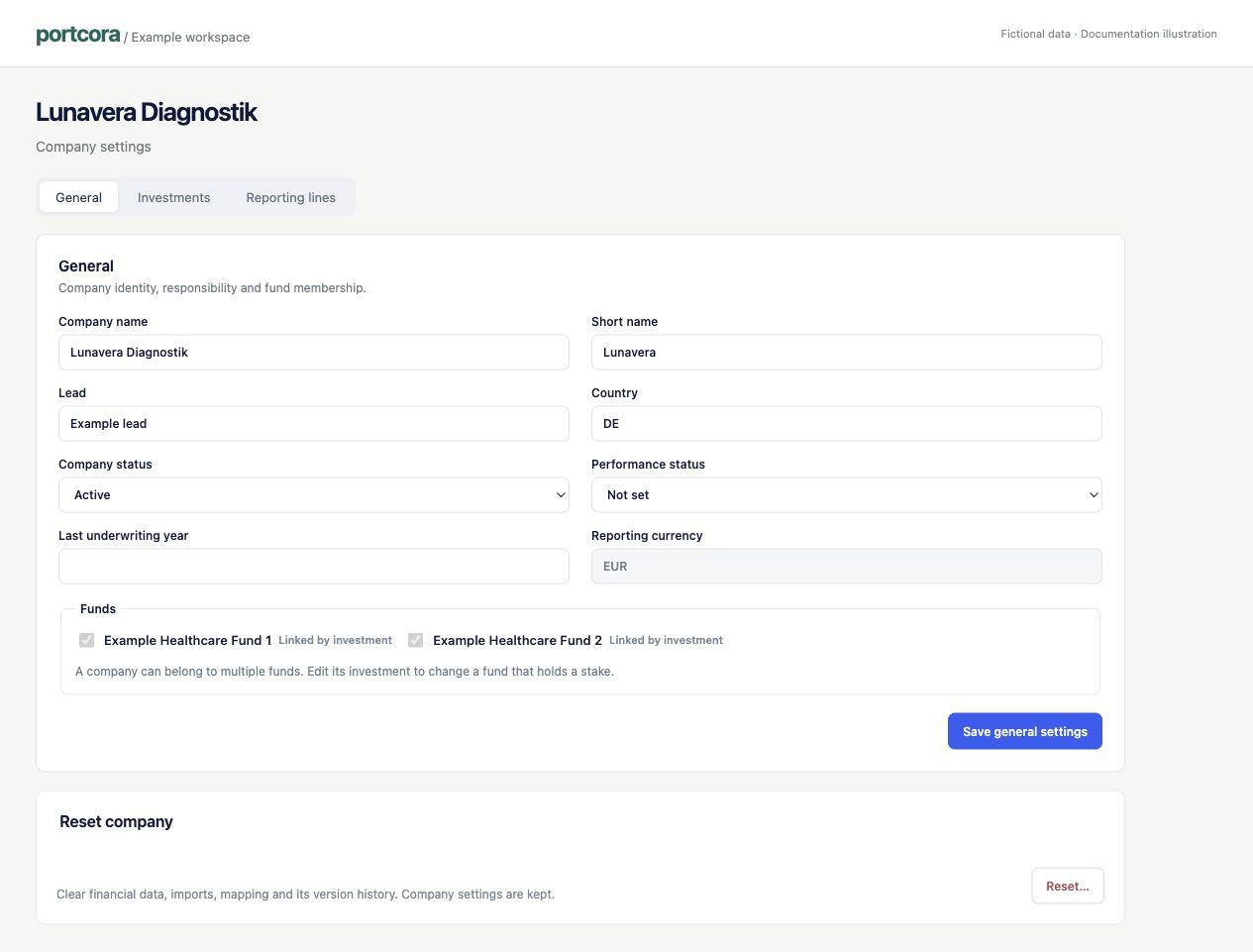
Current company settings, shown with fictional data.
Fund membership and investments
A company can belong to multiple funds. A fund marked Linked by investment cannot be removed with the General checkbox; review the holding in Company settings → Investments instead. Changing a name, status or fund label does not create a cashflow or approve a valuation.
Reporting currency is read-only in General settings. Use the established company setup process for currency questions.
Reporting lines
Company settings → Reporting lines maintains company-specific lines and their standard category. Read mapping and reporting lines before changing definitions.
Check the result
Reopen the company and confirm the saved details and fund membership. Check that you edited the intended company.
Reset is not a troubleshooting shortcut
Reset company is a destructive working-data action with a company-name confirmation. Do not use it to fix a display filter, missing permission or unresolved mapping. Ask your administrator first.